Saturday, July 1, 2017

Approval process using apex.

Approval process using apex

An approval process is an automated process which can be used to approve/reject record updates. A record can be submitted for approval request from related list "Approval History". Once a records is submitted it goes for approval to a specified approver. This is a manual process where in every record should be individually sent for approval.
 How about doing this using apex? Sending the record fro approval from trigger? Salesforec provides number of method for handling approval processes in apex.

Let us submit a record for approval process from trigger in an example below.

Lets say you have a approval process named "Account Owner Approval". You can create a approval process by navigating to following:

set up --> create --> approval process 


Trigger to submit a account record for approval if its annual revenue is less then 2000

trigger Call_AprovalProcess_In_Trigger on Account (before insert, before update) {
 for(Account acc:trigger.new){
    if(acc.AnnualRevenue < 2000){
       approval.ProcessSubmitRequest aprlPrcs = new Approval.ProcessSubmitRequest();     
       aprlPrcs .setComments('Submitting record for approval.');
       aprlPrcs.setObjectId(acc.id);
       approval.ProcessResult result = Approval.process(aprlPrcs);
    }
 }
}

Dynamic Approval Process in Salesforce using Apex and Trigger

This article explain the Automatic submission of Approval process using Apex and trigger. It include Automatic submission, approval as well as rejection of record completely using Apex and trigger.
Although this is very common approach and lots of articles are around on this topic, still I want to delineate the topic in other way. This topic covers complete scenarios for the approval process based on the Apex class.
Agenda of this article:
1.       Automatically submit the record for approval on the basis of field value.
2.      Automatically select the next Approver.
3.      Approve / Reject the record on the basis of field.
Assumptions:
·         Opportunity Object is used.
·         Approval Process is already set on the Opportunity.
·         Field “Next_Approver” will decide that who is going to approve the record.
·         There are three steps in the approval process.
·         There is no test class written and no check for mandatory fields needed for the trigger, as I have considered positive scenarios only.
Important URLS:
API of Approval Process classes:
1.       Apex process
2.      Apex ProcessRequest
3.      Apex_ProcessResult
Steps of Standard approval process defined:
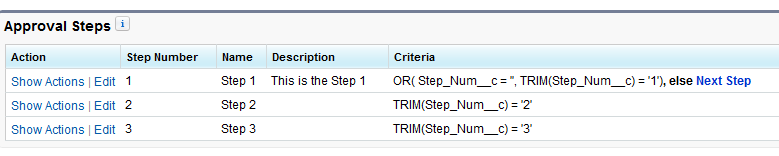
Description: Approval Process StepsApproval Process Steps
To achieve this, I am going to create the trigger named “AutomateApprove”.
Automatically submit the approval process using trigger – Apex:
Below method is used to automatically submit the approval process using trigger.
public void submitForApproval(Opportunity opp)
    {
        // Create an approval request for the Opportunity
        Approval.ProcessSubmitRequest req1 = new Approval.ProcessSubmitRequest();
        req1.setComments('Submitting request for approval automatically using Trigger');
        req1.setObjectId(opp.id);
        req1.setNextApproverIds(new Id[] {opp.Next_Approver__c});

        // Submit the approval request for the Opportunity
        Approval.ProcessResult result = Approval.process(req1);

    }

Class “ProcessSubmitRequest is used to automatically submit the approval process. We need to set following items while submitting the approval process using trigger:
·         Comment
·         TargetObjectId
·         NextApproverIds – if needed. Here Custom logic can be written to dynamically set approver for approval process. In this case I am using the custom field present on the Opportunity.
Automatically approve the approval process using trigger – Apex:
Below method is used to automatically approve the approval process using trigger.
/*
    * This method will Approve the opportunity
    */
    public void approveRecord(Opportunity opp)
    {
        Approval.ProcessWorkitemRequest req = new Approval.ProcessWorkitemRequest();
        req.setComments('Approving request using Trigger');
        req.setAction('Approve');
        req.setNextApproverIds(new Id[] {opp.Next_Approver__c});
        Id workItemId = getWorkItemId(opp.id);

        if(workItemId == null)
        {
            opp.addError('Error Occured in Trigger');
        }
        else
        {
            req.setWorkitemId(workItemId);
            // Submit the request for approval
            Approval.ProcessResult result =  Approval.process(req);
        }
    }

Class “ProcessWorkitemRequest is used to automatically approve the approval process. We need to set following items while submitting the approval process using trigger:
·         Comment
·         TargetObjectId
·         NextApproverIds – if needed
·         WorkItemId – Custom code required to get this
Get the WorkItemId for the pending approval process of the Object:
This is the tricky part, if the Submission and approval of the record is done in single code block then it’s very easy to get the WorkItemId of the needed process.
Here the standard code snap provided:
After Submission the approval process using Apex we get the object of class “ProcessResult.
1
Approval.ProcessResult result = Approval.process(req1);
And from the class we can get workitemid as :
1
List<Id> newWorkItemIds = result.getNewWorkitemIds();
And set the id like:
1
req2.setWorkitemId(newWorkItemIds.get(0));
Other method to get the “WorkItemId” :
The above code was not usable in our scenario as the submission and approval or rejection was done at different level. So I have created following utility method to get the WorkitemId of the supplied Object’s id. Here I have considered that only one workitem will present.
public Id getWorkItemId(Id targetObjectId)
    {
        Id retVal = null;

        for(ProcessInstanceWorkitem workItem  : [Select p.Id from ProcessInstanceWorkitem p
            where p.ProcessInstance.TargetObjectId =: targetObjectId])
        {
            retVal  =  workItem.Id;
        }

        return retVal;
    }

As you can see, we need to query the object “ProcessInstanceWorkitem to get workitemId of the object.
Automatically reject the approval process using trigger – Apex:
Following code is used to reject the approval process using code.
public void rejectRecord(Opportunity opp)
    {
        Approval.ProcessWorkitemRequest req = new Approval.ProcessWorkitemRequest();
        req.setComments('Rejected request using Trigger');
        req.setAction('Reject');
        //req.setNextApproverIds(new Id[] {UserInfo.getUserId()});
        Id workItemId = getWorkItemId(opp.id);

        if(workItemId == null)
        {
            opp.addError('Error Occured in Trigger');
        }
        else
        {
            req.setWorkitemId(workItemId);
            // Submit the request for approval
            Approval.ProcessResult result =  Approval.process(req);
        }
    }

Execution of Approval process using Apex and trigger:
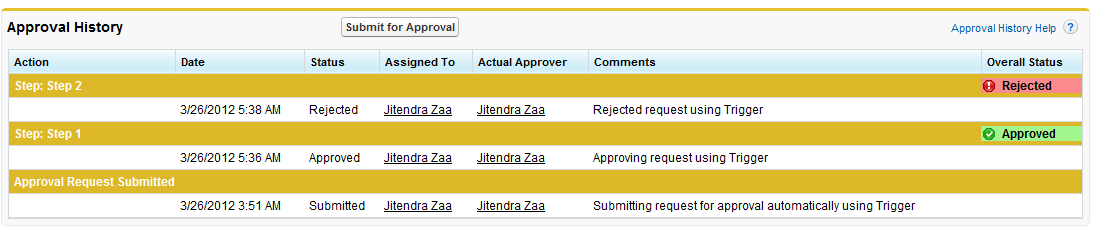
Description: Approval Process Log After ExecutionApproval Process Log After Execution
Complete code:
trigger AutomateApprove on Opportunity(After insert, After update)
{

    for (Integer i = 0; i < Trigger.new.size(); i++)
    {
     try
     {
        if( Trigger.isInsert || (Trigger.new[i].Next_Step__c == 'Submit' && Trigger.old[i].Next_Step__c != 'Submit'))
        {
           submitForApproval(Trigger.new[i]);
        }
        else if(Trigger.isInsert || (Trigger.new[i].Next_Step__c == 'Approve' && Trigger.old[i].Next_Step__c != 'Approve'))
        {
             approveRecord(Trigger.new[i]);
        }
        else if(Trigger.isInsert || (Trigger.new[i].Next_Step__c == 'Reject' && Trigger.old[i].Next_Step__c != 'Reject'))
        {
             rejectRecord(Trigger.new[i]);
        }
     }catch(Exception e)
     {
         Trigger.new[i].addError(e.getMessage());
     }
    }

    /**
    * This method will submit the opportunity automatically
    **/
    public void submitForApproval(Opportunity opp)
    {
        // Create an approval request for the Opportunity
        Approval.ProcessSubmitRequest req1 = new Approval.ProcessSubmitRequest();
        req1.setComments('Submitting request for approval automatically using Trigger');
        req1.setObjectId(opp.id);

        req1.setNextApproverIds(new Id[] {opp.Next_Approver__c});

        // Submit the approval request for the Opportunity
        Approval.ProcessResult result = Approval.process(req1);
    }

        /**
        * Get ProcessInstanceWorkItemId using SOQL
        **/
    public Id getWorkItemId(Id targetObjectId)
    {
        Id retVal = null;

        for(ProcessInstanceWorkitem workItem  : [Select p.Id from ProcessInstanceWorkitem p
            where p.ProcessInstance.TargetObjectId =: targetObjectId])
        {
            retVal  =  workItem.Id;
        }

        return retVal;
    }

    /**
    * This method will Approve the opportunity
    **/
    public void approveRecord(Opportunity opp)
    {
        Approval.ProcessWorkitemRequest req = new Approval.ProcessWorkitemRequest();
        req.setComments('Approving request using Trigger');
        req.setAction('Approve');
        req.setNextApproverIds(new Id[] {opp.Next_Approver__c});
        Id workItemId = getWorkItemId(opp.id);

        if(workItemId == null)
        {
            opp.addError('Error Occured in Trigger');
        }
        else
        {
            req.setWorkitemId(workItemId);
            // Submit the request for approval
            Approval.ProcessResult result =  Approval.process(req);
        }
    }

    /**
    * This method will Reject the opportunity
    **/
    public void rejectRecord(Opportunity opp)
    {
        Approval.ProcessWorkitemRequest req = new Approval.ProcessWorkitemRequest();
        req.setComments('Rejected request using Trigger');
        req.setAction('Reject');
        Id workItemId = getWorkItemId(opp.id);  

        if(workItemId == null)
        {
            opp.addError('Error Occured in Trigger');
        }
        else
        {
            req.setWorkitemId(workItemId);
            // Submit the request for approval
            Approval.ProcessResult result =  Approval.process(req);
        }
    }
}

Note on possible errors:
1.If you have the “manual Selection of approver” enabled for your approval process/steps then you must specify the approver in the trigger, else you will get an error something like:
“System.DmlException: Process failed. First exception on row 0; first error: REQUIRED_FIELD_MISSING, missing required field: []”
2.If you set the wrong WorkitemId then may get following error:
Process failed. First exception on row 0; first error: INVALID_CROSS_REFERENCE_KEY, invalid cross reference id: []
updated on 25-March-2015

Question :
1. Can we add multiple users (Parallel Approval process) as a aprrover automated using above code?
Ans : No. Logic in above code is that we need to select next approver option as “manual”. Currently we cannot use multiple users manually in approval process, you can vote this idea for this feature support. Only solution is to have multiple steps for each approver.


Javascript validation in visualforce page?

Using java script makes it easy to show validation messages as pop ups in a visualforce page. We can call java script function to validate the Input value and subsequently show a pop up message to indicate to the user. 

Following visualforce page uses java script to check if the user had typed Expected price after submit button is pressed.

Visualforce Page:

<!-- Using java script for validation in a visualforce page -->
<apex:page standardcontroller="Account">
  <apex:form >
        <apex:pageBlock >
           Expected price  : <apex:inputText id="inptpriceID"/>
                       <apex:commandButton onclick="validateFunction('{!$Component.inptpriceID}')" value=" Submit Price"/>
        </apex:pageBlock>
  </apex:form>
  
  <!-- Java script starts Here -->
  <script>
   function validateFunction(amountinputID){
       var inputAmount = document.getElementById(amountinputID).value;
         if(inputAmount == ''){
            alert('Please enter amount before submitting price');
         } 
  }
  </script> 
 <!-- java script ends here -->  
</apex:page> 


validateFunction receives html id of the inputtext (Expected price) and from this id checks whether any input was provided, if there was no input then a alert pop is shown.

output:


What is action support salesforce?

What is action support salesforce?


Action support component adds AJAX support to another component, this allows the component to call a controller method when a particular event occurs(for example onlcik, onblur etc). It also allows to rerender,rendere page sections as desired.

In the following example a controller method is called when you click within a textbox using actionsuppot component.

Controller :


Public with sharing class DemoController {
Public String outValueSecond{get;set;}
Public String outvalue{get;set;}
Public boolean flag{get;set;}
  Public DemoController(){
     outvalue = 'Before Value';
     outValueSecond = 'before value set in constructor';
  }
   
  Public void DemoMethod(){
   outValueSecond = 'After value set in controller method. This method is called using action support added to inputtext compoennt';
  }
}

Visualforce Page: 


<apex:page controller="DemoController">
   <apex:form >
       <apex:pageBlock >
             Click Inside this block <apex:inputtext >
            <apex:actionSupport event="onclick" action="{!DemoMethod}" rerender="pgblck"/>
            </apex:inputtext>  
       </apex:pageBlock>
       <apex:pageblock id="pgblck">
             <apex:outputText value="{!outValueSecond }"/>
       </apex:pageblock>
   </apex:form>
</apex:page>


In this example initially the lower pageblock has a value that is set in constructor, but when the mouse is clicked in the text box the controller method is called which changes the value of the variable that is displayed in the lower pageblock. The controller is called by using action support for the inputtext. The action support also rerenders the lower page block which refreshes the lower block and hence shows the new value set in controller method.


what is record is read-only trigger?

This post is regarding a error that we get because of trigger. "execution of AfterUpdate caused by: System.FinalException: Record is read-only"
This kind of error occurs if you try to update lists/record which are/is read only in the trigger execution. For example, trigger.new and trigger.old are both read only lists and cannot be applied with a DML operation.

Say if you write Update trigger.new; in your trigger you will get the above mentioned error.
A field value of object can be changed using trigger.new but only in case of before triggers. But in case of after triggers changing the values of the records in trigger.new context will throw exception as "Record is read only"
Example:

trigger mytrigger on account(before insert,before update){
  for(account ac:trigger.new){
      ac.name ='new name';
  }
}
Above code will update the names of the records present in trigger.new list. But, the below code will throw run time exception "Record is read only".
trigger mytrigger on account(after insert,after update){
  for(account ac:trigger.new){
      ac.name ='new name';
  }
}
Also trigger.old will always be read only no matter where you use it either before trigger or after trigger.
That is both the below codes will throw run time exception as trigger.old is read only
trigger mytrigger on account(after insert,after update){
  for(account ac:trigger.old){
      ac.name ='new name';
  }
}
trigger mytrigger on account(before insert,before update){
  for(account ac:trigger.old){
      ac.name ='new name';
  }
}
Note:
1. Trigger.new and trigger.old are read only
2. An object can change its own field values only in before trigger: trigger.new
3. In all cases other than mentioned in point 2; fields values cannot be changed in trigger.new and would cause run time exception "record is read only"
Even if we wand to save the record in read only mode trigger see the below code:
trigger ReadonlyforconTrigger on Contact (after insert) {
    
    if(trigger.isafter && Trigger.isinsert){
        for(contact con : trigger.new){
        if(con.department== Null ){
            ReadonlyforconCls.m1(con.id);
       //  con.department = 'readonly';
        }
        }
    }
}
------------
public class ReadonlyforconCls {
    public static void m1(string conid){
        contact con =[select id,lastname,department,PickVal__c from contact where id =:conid];
        con.department = 'readonly';
        update con;
    }

}

Dynamic SOQL And SOSL in Visual force Page for search:

<apex:page controller="searchcls">
  <apex:form >
     <apex:pageBlock >
       <apex:pageBlockSection >
       <apex:pageBlockSectionItem >
         <apex:outputLabel > Contact Name</apex:outputLabel>
         <apex:inputText value="{!searchtext}"/>
       </apex:pageBlockSectionItem>
       <apex:commandButton value="Search" action="{!search}"/>
        </apex:pageBlockSection>
     </apex:pageBlock>
     <apex:pageBlock >
       <apex:pageBlockTable value="{!lstcon}" var="c">
          <apex:column value="{!c.lastname}"/>
          <apex:column value="{!c.firstname}"/>
          <apex:column value="{!c.email}"/>
          <apex:column value="{!c.phone}"/>
       </apex:pageBlockTable>
     </apex:pageBlock>
  </apex:form>
</apex:page>
---------
Class:
public with sharing class searchcls {
     
    public String searchtext { get; set; }
    public list<contact> lstcon{get;set;}
    public PageReference search() {
    String tempInput ='\'%' +searchtext+ '%\'';
     lstcon = new list<contact>();
     string qry ='select id,name,lastname,firstname,email,phone from contact where lastname  like'+tempInput +'order by lastname limit 10'; 
     lstcon = database.query(qry);
     system.debug('--------->'+lstcon);
        return null;
    }
}
---------
SOSL: 
<apex:page controller="SOQLSearchcls" tabStyle="account">
  <apex:form >
    <apex:pageBlock >
      <apex:pageBlockSection >
        Search for All Field Values<apex:inputText value="{!searchtext}"/>
        <apex:commandButton value="search" action="{!search}"/>
      </apex:pageBlockSection>
      <apex:pageBlockSection title="Account Details">
      <apex:pageBlockTable value="{!lstacc}" var="a">
        <apex:column value="{!a.name}"/>
         <apex:column value="{!a.accountnumber}"/>
        <apex:column value="{!a.phone}"/>
        <apex:column value="{!a.fax}"/>
        <apex:column value="{!a.type}"/>
        <apex:column value="{!a.industry}"/>
       
      </apex:pageBlockTable>
       </apex:pageBlockSection>
        <apex:pageBlockSection title="Contact Details">
        <apex:pageBlockTable value="{!lstcon}" var="c">
        <apex:column value="{!c.lastname}"/>
         <apex:column value="{!c.firstname}"/>
        
      </apex:pageBlockTable>
      </apex:pageBlockSection>
    </apex:pageBlock>
  </apex:form>
</apex:page>
-----
Class:

public with sharing class SOQLSearchcls {
    
    public list<account> lstacc{get;set;}
     public list<contact> lstcon{get;set;}

    public String searchtext { get; set; }
    public PageReference search() {
    
     list<list<sobject>> searchlist =[find :searchtext returning account(name,accountnumber,type,phone,fax,industry),contact(lastname,firstname)];
     system.debug('------'+searchlist );
     lstacc = ((list<account>)searchlist[0]);
      lstcon = ((list<contact>)searchlist[1]);

        return null;
    }

}

SOQL Injection in Salesforce?

Suppose you have a search form and instead of typing a valid search parameter, User types something invalid text  and that can make your SOQL query invalid and expose the unexpected result.

This situation occurs when user input is not filtered for escape characters. let's have a pictorial look :


It's a SQL example , but describe the SOQL injection as well in a good manner.
So here you can see that. In the User id field once user puts a invalid parameter and goes to the controller and form a query that  results in a invalid login.

The worst scenario could be if resultant data from a query supposed to be deleted.
 let's have one more quick example for this :

I have a case where I want to delete the Account based on name entered in the input name field on page.
Implementation can be like this :

List<Account> listAccount = Database.query('Select id from Account where Name = \'' + nameField + '\' '); 

delete listAccount;


It works great with a valid value.
 Now it can be worst if value of nameField is provided like :

nameField = \' OR Id != null OR Type != \'


So once the action will be performed, this will be bind-up with the query and resultant query will be like this :
  

List<Account> listAccount = Database.query('Select id from Account where Name = \'\'\' OR ID != null OR Type != \'\' ');

delete  listAccount;


So hopefully , you can see the monster  here. It will delete the entire database for account records.

Salesforce provides escape functions to get rid from SOQL injection. 
Solution can be one of the followings:

  1. Try to use STATIC queries as much as possible. STATIC query has inbuilt escaping.
  2. If dynamic query is needed , then all the search parameters should use escapeSingleQuotes() function.like
    List<Account> listAccount = Database.query('Select id from Account where Name = \'' + String.escapeSingleQuotes(nameField) + '\' ');
String.escapeSingleQuotes method adds the escape character (\) to all single quotation marks in a string that is passed in from a user. The method ensures that all single quotation marks are treated as enclosing strings, instead of database commands.