Sunday, November 21, 2021

How to deserializes respone in Apex using deserialize(jsonString, apexType)?

 {

 {

  "nameofsystem": "ExternalSystem1",

  "event": {

    "recorddata": {

      "state": "Success",

      "recordItem": [

        {

          "id": "1",

          "name": "testRecord1"

        },

        {

          "id": "2",

          "name": "testRecord2"

        }

      ]

    }

  }

}

In webservice class,


@RestResource(urlMapping='/postrecorddata/*')

   global with sharing class postrecorddata {

       @HttpPost

      global static returnResponseWrapper postrecorddatamethod(){

        RestRequest req = RestContext.request;

        RestResponse res = Restcontext.response;

        responeWrapper wrapObj= (responeWrapper)                                            JSON.deserialize(req.requestbody.toString(),responeWrapper.class);

        // To get the the state from JSON response.

        String stateInResponse = wrapObj.event.recorddata.state;

        // Perform operations

       returnResponseWrapper obj=new returnResponseWrapper();

        obj.message='Data Posted successfully';

        obj.statusCode = '200';

        // Overriding RestResponse object value

        res.statusCode = '200';

        return obj;


      }


// Wrapper class for handling request

global class responeWrapper{

 global string nameofsystem;

 global eventData event;


}

global class eventData{

 global recorddataObj recorddata;

}


global class recorddataObj{

 global string state;

 global recordItemClass[] recordItem;


}


global class recordItemClass{

 global string id; 

 global string name;

}

// Wrapper class for handling request


// Wrapper class for response

      global class returnResponseWrapper{

        global string message;

        global integer statusCode;

        }


// Wrapper class for responde


}

Export CSV File data by using Apex Code

 List<company__c> extractcompanyMemList = new List<company__c>();

List<company__c> companytList = [select id,name,(select id from companymemebers__r) from company__c];

for(RequestClaimJunction__c company: companytList){
	List<companymemeber__c> companyMemList = company.companymemebers__r;
	if(companyMemList.size() == 0) {
		extractcompanyMemList.add(company);
	}
}

String generatedCSVFile ='';
List<String> queryFields = new List<String>{'Id','Partner Account','Status'};
String fileRow = '';

for(company__c company: extractcompanyMemList){
	fileRow = '';
	fileRow = fileRow +','+ company.Id;
	fileRow = fileRow +','+ company.Name;
	fileRow = fileRow.replaceFirst(',','');
	generatedCSVFile = generatedCSVFile + fileRow + '\n';
}

Messaging.EmailFileAttachment csvAttachment = new Messaging.EmailFileAttachment();
Blob csvBlob = blob.valueOf(generatedCSVFile);
String csvName = 'company details which doesn't have members.csv';
csvAttachment.setFileName(csvName);
csvAttachment.setBody(csvBlob);
Messaging.SingleEmailMessage email = new Messaging.SingleEmailMessage();
String[] toAddresses = new String[]{'Your Email Id'};
String subject = 'company details which doesn't have members CSV';
email.setSubject(subject);
email.setToAddresses(toAddresses);
email.setPlainTextBody('company details which doesn't have members CSV');
email.setFileAttachments(new Messaging.EmailFileAttachment[]{csvAttachment});
Messaging.SendEmailResult[] r = Messaging.sendEmail(new Messaging.SingleEmailMessage[]{email});

Find Second Largest number from List of Integers

 list<Integer> integerList =new list<Integer>{7, 21, 45, 6,34,56,78,26,65,87,95};

// DESCENDING ORDER

for(Integer i = 0 ; i < integerList.size() ; i ++) {

for(integer j = i+1 ; j <= integerList.size() -1 ; j ++ ){

  integer x = 0 ;

  if(integerList[i] <  integerList[j]){

   x = integerList[i]  ;

   integerList[i] = integerList[j]  ;

   integerList[j]  = x;

  }

}  

}

system.debug(integerList) ;

system.debug('Ssize: '+integerList[1]);

Parent Status Update when all child's status updated to inactive

 public static void updateAccountB2BStatus(List<Contact> lstNewContacts){


        map<id,Account> mapUpdateAcc = new map<id,Account>();

        set<id> accIds = new set<id>();

        for(contact con : lstNewContacts){

            if(con.AccountId != null)

                accIds.add(con.accountid); 

        }

        Id CommercialPartnerId = Schema.SObjectType.Account.getRecordTypeInfosByName().get('Commercial Partner').getRecordTypeId();


        Id OutletId  = [SELECT Id, SobjectType, Name, DeveloperName FROM RecordType WHERE SobjectType='Account'

                        and DeveloperName='Retail_Account' LIMIT 1].Id;


        for(account acc : [Select Id,B2B_Status__c,(Select id,ivybat__B2B_Portal_User_Status__c,accountid from Contacts

                                                    where (ivybat__B2B_Portal_User_Status__c ='Active' OR ivybat__B2B_Portal_User_Status__c='Pending Deactivation')) from Account 

                           where id IN: accIds and (RecordTypeID =: CommercialPartnerId OR RecordTypeID =: OutletId)]){

                               if(acc.contacts.size()>0 && acc.B2B_Status__c != 'Active'){

                                   acc.B2B_Status__c = 'Active';

                                   mapUpdateAcc.put(acc.id,acc);

                               } else if(acc.contacts.size() == 0 && (acc.B2B_Status__c == 'Active' || acc.B2B_Status__c == null)){

                                   acc.B2B_Status__c = 'Inactive';

                                   mapUpdateAcc.put(acc.id,acc);

                               }

                           }

        if(mapUpdateAcc.size()>0){

            update mapUpdateAcc.values();

        }

    }

Saturday, November 20, 2021

SFDC Integration

 Rest API.


Connected APP in OrgB


Auth. Provider In OrgA

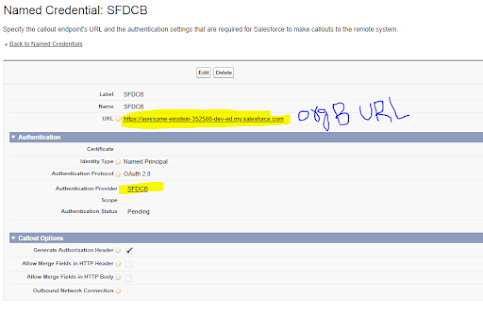
Named Credential In OrgA

RestResource Class:
@RestResource(urlMapping='/Cases/*')
global with sharing class CaseManager {
    @HttpGet
    global static list<Case> getCases() {
        list<Case> result =  [SELECT CaseNumber,Subject,Status,Origin,Priority FROM Case limit 10];
        return result;
    }
    @HttpPost
    global static ID createCase(String subject, String status,
        String origin, String priority) {
        Case thisCase = new Case(
            Subject=subject,
            Status=status,
            Origin=origin,
            Priority=priority);
        insert thisCase;
        return thisCase.Id;
    }   
}

SalesforceConnect Class to Authenticate to OrgB and Get and create cases using named credential :
public class salesforceConnect {
    public static void getCasesFromSalesforceOrgB() {
        Http http = new Http();
        HttpRequest request = new HttpRequest();
// calling Named Credential Like below ----- callout:SFDCB
//Calling rest resource class like services/apexrest/cases
        request.setEndpoint('callout:SFDCB/services/apexrest/cases');
        request.setMethod('GET');
        HttpResponse response = http.send(request);
        if(response.getStatusCode() == 200) {
            list<Object> Results = (list<Object>) JSON.deserializeUntyped(response.getBody());
           // Map<String, Object> results = (Map<String, Object>) JSON.deserializeUntyped(response.getBody());
            System.debug('Received the following cases:');
            for(Object result: Results) {
                Map<String, Object> caseProps = (Map<String, Object>) result;
                System.debug('CaseNumber'+caseProps.get('CaseNumber')+'- SubJect'+caseProps.get('Subject'));
            }
        }
    }
    public static void  createCaseInOrgB() {
       Http http = new Http();
        HttpRequest request = new HttpRequest();
        request.setEndpoint('callout:SFDCB/services/apexrest/cases');
        request.setMethod('POST');
        request.setBody('{"CaseNumber":"00001026","Subject":"Bigfoot Sighting!","Status":"New","Origin":"Phone","Priority":"Low"}');
        HttpResponse response = http.send(request);
        if(response.getStatusCode() == 200) {
            list<Object> Results = (list<Object>) JSON.deserializeUntyped(response.getBody());
           // Map<String, Object> results = (Map<String, Object>) JSON.deserializeUntyped(response.getBody());
            System.debug('Received the following cases:');
            for(Object result: Results) {
                Map<String, Object> caseProps = (Map<String, Object>) result;
                System.debug('CaseNumber'+caseProps.get('CaseNumber')+'- SubJect'+caseProps.get('Subject'));
            }
        }
    }
}


Friday, November 19, 2021

Future Method Vs Queueable Apex in Salesforce


Future Method Vs Queueable Apex in Salesforce


Why Future?

If you want to run processes in a separate thread, at a later time and want to execute the code asynchronously, we need to use future methods.

When it is used?

These are used for long-running operations such as callouts to external Web services or any operation you would like to run in its own thread

Why Queueable Apex?

Like the future is also used to execute the asynchronous code, and it enables you to add jobs in a queue and enhance the way of running asynchronous code in comparison to the future method.

When it is used?

For Apex processes that run for a long time, such as extensive database operations or external Web service callouts, you can run them asynchronously by implementing the Queueable interface

Differences between Future and Queueable Apex:

Future MethodQueueable Job
1. Future will never use to work on SObjects or object types.

2. When using the future method we cannot monitor the jobs which are in process.

3. The future method cannot be called inside the future or batch class.

4. The future method will never be queued.

1. Queueable Jobs can contain the member variable as SObjects or custom Apex Types.

2. When using queueable jobs it will make the AsyncApexJob which we can monitor like Scheduled jobs.

3. Queueable Apex can be called from the future and batch class.

4. Using Queueable Apex will chain up to queueable jobs and in Developer Edition it is only 5 Jobs.

Queueable Apex

The Queueable class is a class that is created by implementing the pre-defined Interface “Queueable”. This interface enables the way of running your asynchronous jobs or code of job in comparison to the future method. It will enable you to monitor the jobs which are in the queue (this queue is created by Queueable interface so that the jobs can run asynchronously).

Syntax:

public class <Name of Queueable Class> implements Queueable {
//This is the only method which is contained by the Queueable Interface and required to inherit this method in Queueable class.
public void execute (QueueableContext context) {
//Code which needs to be executed
}
}

Any Apex process which takes a long time in execution, such as extensive database operations or external Web service callouts, you can run them asynchronously by implementing the Queueable interface and adding a job to the Apex job queue.

Your asynchronous apex job runs in the background in its own thread and doesn’t delay the execution of your main Apex logic. Each queued job runs when system resources become available. A benefit of using the interface methods is that some governor limits are higher than for synchronous Apex, such as heap size limits.

Future Apex

Future apex is used to run processes in a separate thread, later when system resources become available. For using future apex we do not need to create any class we just need to use “@future” annotation to identify methods that run asynchronously and to denote that the method described below this annotation is a future method.

When using synchronous processing, all method calls are made from the same thread that is executing the Apex code, and no additional processing can occur until the process is complete. You can use future methods for any operation you’d like to run asynchronously in its own thread. This provides the benefits of not blocking the user from performing other operations and providing higher governor and execution limits for the process.
Syntax:

global class <ClassName> {
//Below is future annotation which defines the given method is future method.
@future
public static void <FutureMethodName>(List<Id> recordIds) {
List<Contact> accounts = [Select Id, FirstName, LastName from Contact Where Id IN :recordIds];
// process contacts records to do awesome stuff
}
}

Future methods are typically used for

Callouts to external Web services. If you are making callouts from a trigger or after performing a DML operation, you must use a future or queueable method. A callout in a trigger would hold the database connection open for the lifetime of the callout.

Operations you want to run in their own thread when time permits such as some sort of resource-intensive calculation or processing of records

Note: Reason of Objects cannot be passed as arguments to future method because the object can change between the time you call the method and the time that it actually executes. Future methods run when system resources become available. When a future method executed it may have old object value, which can cause all sorts of bad things to happen.

Things to Remember

  • The future method must be static
  • The return type must be void
  • The specified parameters must be primitive data types, arrays of primitive data types, or collections of primitive data types
  • You can call future methods the same way you call any other method. However, a future method cannot call another future method
  • No more than 50 method calls per Apex invocation
  • Asynchronous calls, such as @future or executeBatch, called in a startTest, stopTest block, do not count against your limits for the number of queued jobs
Example for Future Method and Queueable Class

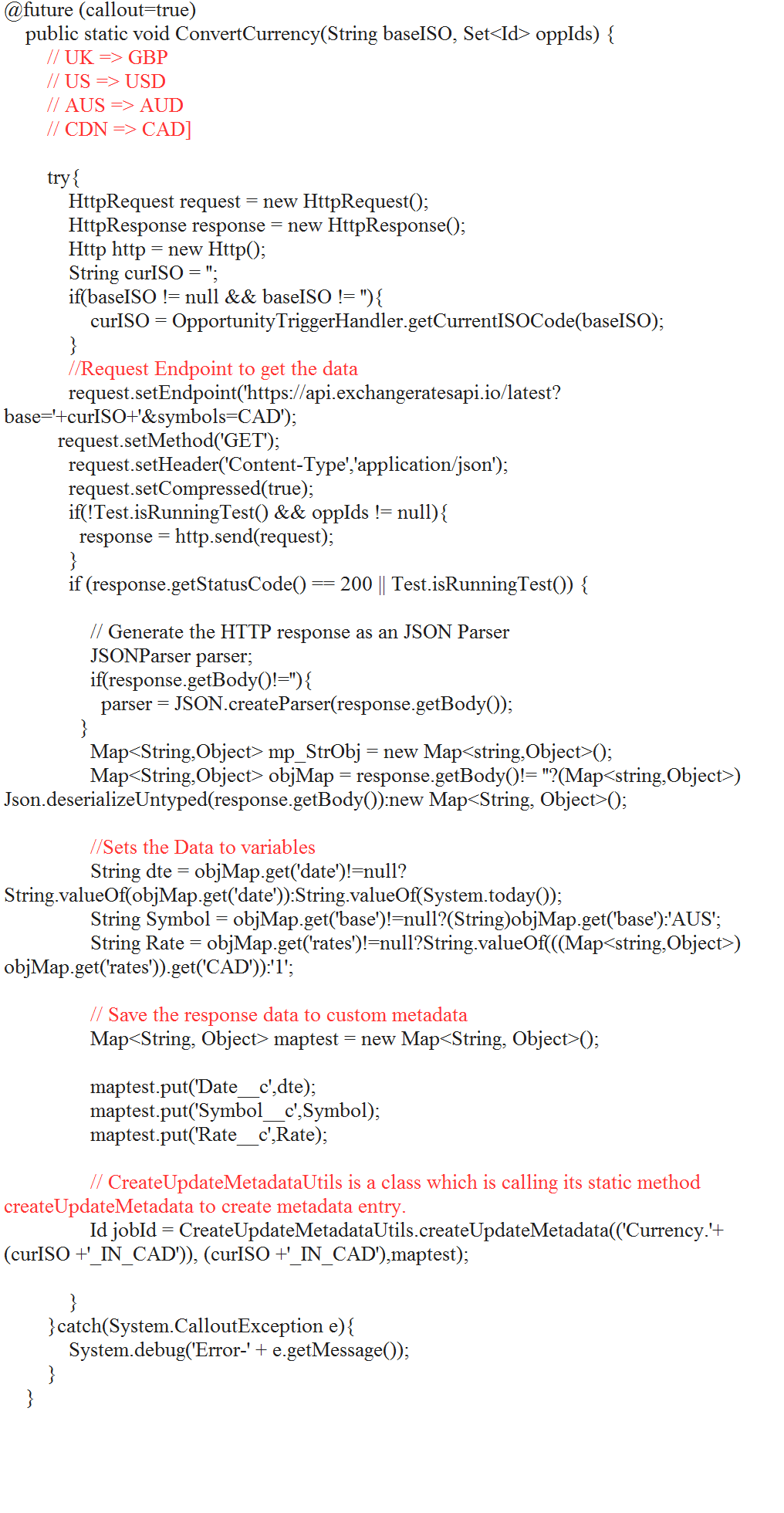
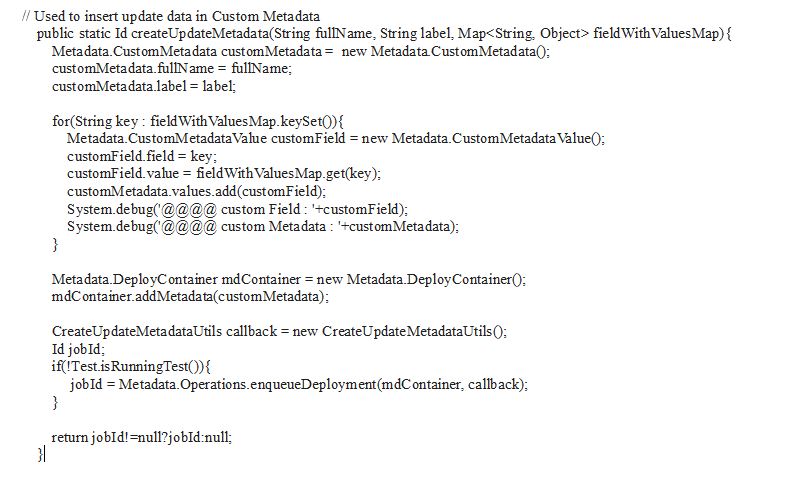
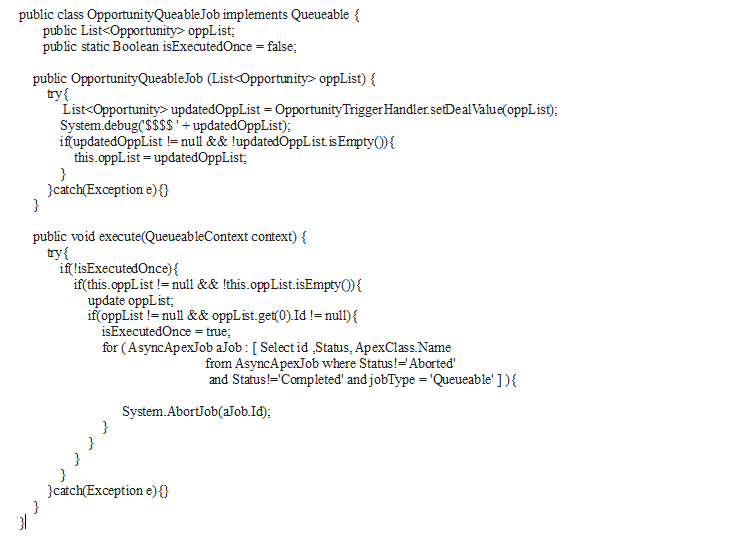
Here I am getting the value of 4 currencies in the Canadian dollar. For GBP, USD, AUD, CAD. And saving the value to custom metadata currency. For HTTPREQUEST here I have used the Future method. And because it is updating multiple records at the same time while running the batch for that I have used Queueable Apex which is updating multiple records at a time.Future Method and Queueable Class

Custom Updating of Custom Metadata

Custom Updating of Custom Metadata

Queueable Class

Queueable Class

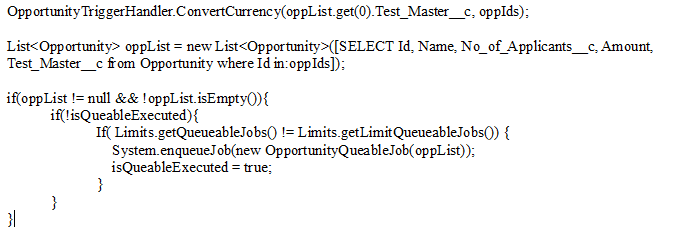
Calling Future method and sending the list to update in Queueable class

Calling Future method


Sunday, April 25, 2021


Set Salesforce CLI Path (Windows)


SFDX Commands Aren’t Available

If you don’t see any SFDX commands in the command palette, make sure that you’re working on a Salesforce DX project and that you have the latest version of Salesforce CLI.

  1. Make sure that the root directory you have open in VS Code contains an sfdx-project.json file. If you haven’t set up a Salesforce DX project, check out Project Setup in the Salesforce DX Developer Guide.
  2. Update Salesforce CLI, as described in the Salesforce DX Setup Guide.

Set Your Java Version

See: Java Configuration

Set Salesforce CLI Path (Windows)

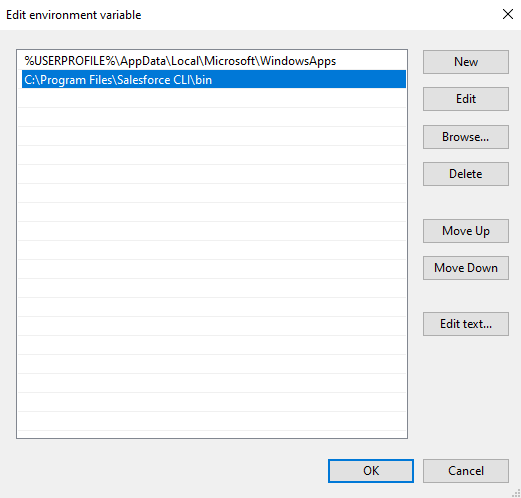
See Installing the Salesforce CLI. After installing Salesforce CLI, if you get the error ‘Salesforce CLI is not installed’, most likely Salesforce CLI is not added as a path variable. To verify or add Salesforce CLI to your Windows path variable:

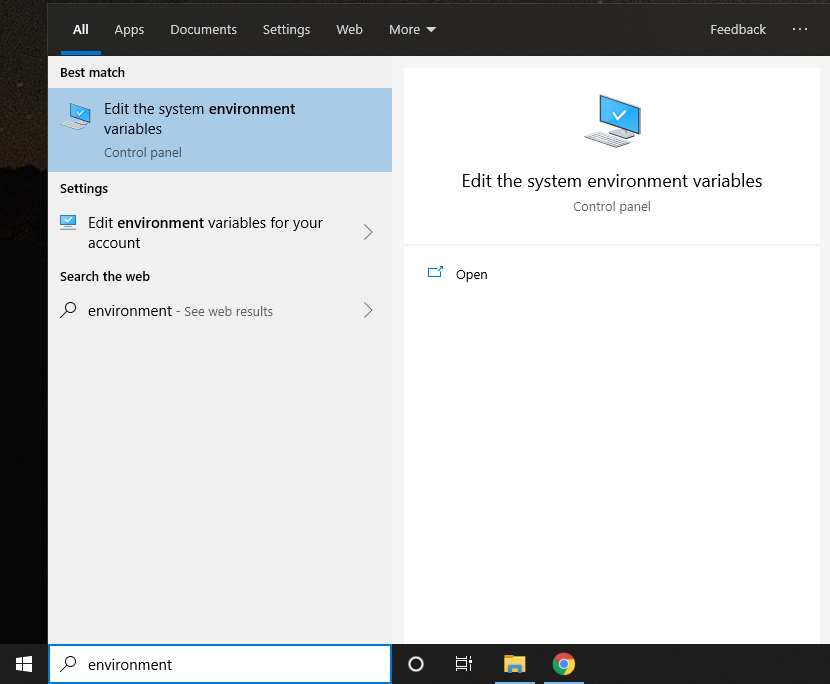
  1. Search for Edit the system environment variablesWindows Search

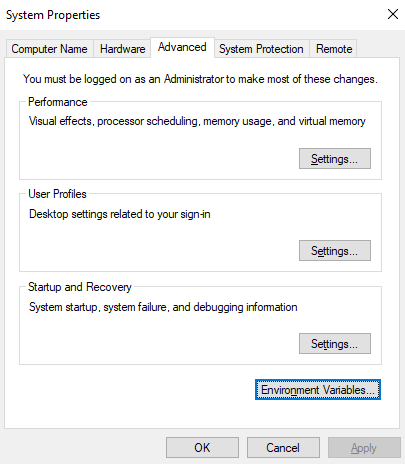
  2. In System Properties, click Environment VariablesSystem Properties

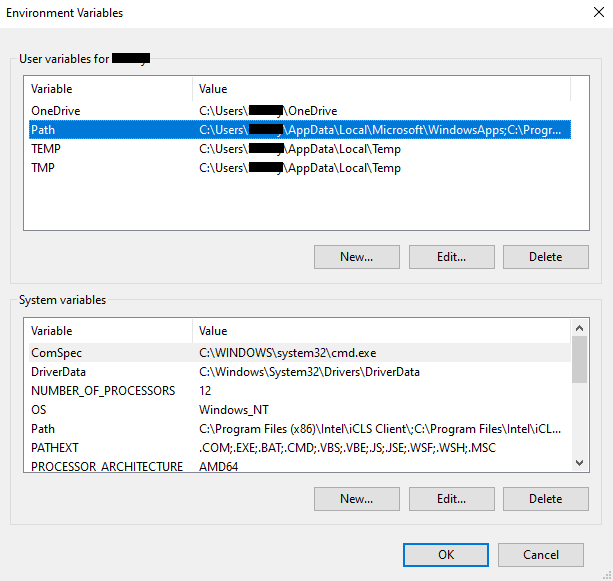
  3. Under User Variables, double-click Path . User Variables

  4. Verify Salesforce CLI is listed as an entry. Otherwise, click New and paste the path where you installed CLI. For example, C:\Program Files\Salesforce CLI\bin Path View

  5. Click OK.

Monitor Apex Language Server Output

The Apex Language Server is an implementation of the Language Server Protocol 3.0 specification. The Language Server Protocol allows a tool (in this case, VS Code) to communicate with a language smartness provider (the server). VS Code uses the Apex Language Server to show outlines of Apex classes and triggers, code completion suggestions, and syntactic errors. To see all diagnostic information from the Apex Language Server, select View > Output, then choose Apex Language Server from the dropdown menu. The diagnostic information gives you insights into the progress of the language server and shows the problems encountered.

Activate the Apex Language Server

If the Apex features aren’t available, activate the Apex Language Server. In the VS Code menu bar, select View > Output and select Apex Language Server from the drop-down list on the right. If you don’t see an “Apex Language Server” entry, the language server didn’t activate.

If the Apex Language Server didn’t activate, ensure that you’ve:

  1. Opened a Salesforce DX project that has a valid sfdx-project.json file.
  2. Opened the Salesforce DX project as a top-level folder.
  3. Installed Java 8 or Java 11; you’ll see a warning if neither version is installed.

If you’ve checked all of the above and nothing is working, check for errors in VS Code itself. In the VS Code menu bar, select Help > Toggle Developer Tools, click Console, and search for relevant messages.

See Debugger Errors

To see errors generated by the debuggers, add "trace": "all" in your launch.json file. Then, re-run your scenario to view debugger log lines in VS Code’s Debug Console.

Improve Deployment Times for Apex Code

If your deployment times for Apex code are slow, your org might have the CompileOnDeploy preference set to true. For details about this preference, see Deploying Apex in the Apex Developer Guide.

Other Resources

For Apex Debugger troubleshooting information, see Apex Interactive Debugger.

For general information about VS Code, see the Visual Studio Code docs.

For troubleshooting information for Salesforce CLI, which powers much of the functionality in Salesforce Extensions for VS Code, see Troubleshoot Salesforce DX in the Salesforce DX Developer Guide.