Friday, May 5, 2023

Lightning Message Service (LMS) in LWC

 Lightning Message Service (LMS) in LWC Salesforce. LMS doesn’t need any relationship between the component. Just publish the event from one component and subscribe by multiple components simultaneously.
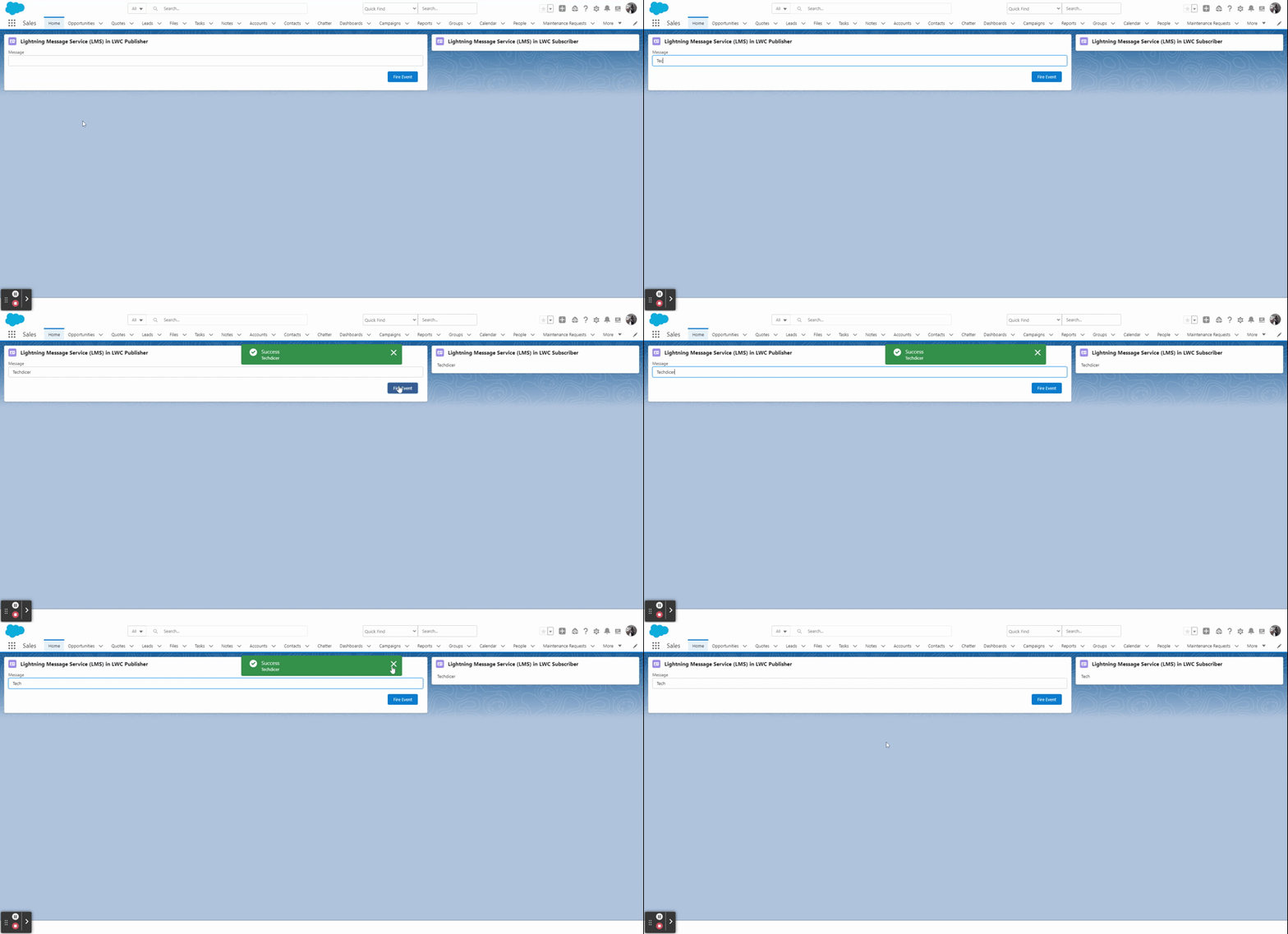
lightning-message-service-(lms)-in-lwc-output

Key Highlights :

  1. Lightning Message Service is based on a new type of metadata: Lightning Message Channels
  2. Enable communication between the Visualforce page, Lightning web components, and Aura components.
  3. In LWC we will be using LMS when we want to send data from one LWC to another LWC which are not in the hierarchy.

Process & Code :

Step 1: Here we will create a Lightning Message Service (LMS) file in the messageChannels folder in the default branch.
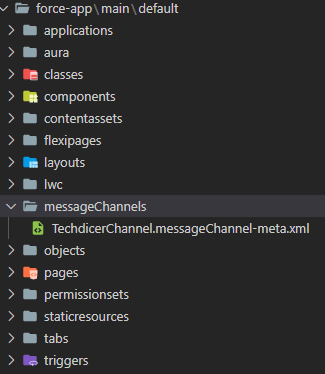
lightning-message-service-(lms)-in-lwc-folder-creatation
lightning-message-services-(lms)-in-lwc-folder-creatation

TechdicerChannel.messageChannel-meta.xml :

1
2
3
4
5
6
7
8
9
10
<?xml version="1.0" encoding="UTF-8"?>
<LightningMessageChannel xmlns="http://soap.sforce.com/2006/04/metadata">
    <description>This is a Lightning Message Service Channel.</description>
    <isExposed>true</isExposed>
    <lightningMessageFields>
        <description>This is sample message</description>
        <fieldName>message</fieldName>
    </lightningMessageFields>
    <masterLabel>TechdicerChannel</masterLabel>
</LightningMessageChannel>

Step 2: In this step, we will create two LWC component which is not related to each other, one is the Publisher and another one is the Subscriber component.

lWCLMS.HTML : this is the Publisher component.

1
2
3
4
5
6
7
8
9
10
11
<template>
    <lightning-card title="Lightning Message Service (LMS) in LWC Publisher" icon-name="standard:contact">
        <div class="slds-p-horizontal_small">
            <lightning-input type="text" label="Message" onchange={handleChange} value={message}></lightning-input>
            <!-- call subscriber -->
            <div class="slds-p-around_medium lgc-bg" style="text-align: end;">
                <lightning-button label="Fire Event" variant="brand" onclick={handleClick}></lightning-button>
            </div>   
        </div>
    </lightning-card>
</template>

lWCLMS.JS :

1
2
3
4
5
6
7
8
9
10
11
12
13
14
15
16
17
18
import { LightningElement, wire } from 'lwc';
import TechdicerChannel from '@salesforce/messageChannel/TechdicerChannel__c';
import {publish, MessageContext} from 'lightning/messageService'
 
export default class LWCLMS extends LightningElement {
    @wire(MessageContext)
    messageContext;
    message;
 
    handleChange(event){
        this.message = event.detail.value;
    }
 
    handleClick() {
        let message = {message: this.message};
        publish(this.messageContext, TechdicerChannel, message);
    }
}

subscriber.HTML : This is the Subscriber Component.

1
2
3
4
5
6
7
<template>
    <lightning-card title="Lightning Message Service (LMS) in LWC Subscriber" icon-name="standard:contact">
        <div class="slds-m-around_medium">
            {publisherMessage}
        </div>
    </lightning-card>
</template>

subscriber.JS :

1
2
3
4
5
6
7
8
9
10
11
12
13
14
15
16
17
18
19
20
21
22
23
24
25
26
27
28
29
30
31
32
33
34
35
36
37
38
import { LightningElement, wire } from 'lwc';
import TechdicerChannel from '@salesforce/messageChannel/TechdicerChannel__c';
import { subscribe, MessageContext } from 'lightning/messageService';
import { ShowToastEvent } from 'lightning/platformShowToastEvent';
 
export default class Subscriber extends LightningElement {
    publisherMessage = '';
    subscription = null;
 
    @wire(MessageContext)
    messageContext;
 
    connectedCallback() {
        this.handleSubscribe();
    }
 
    handleSubscribe() {
        if (this.subscription) {
            return;
        }
        this.subscription = subscribe(this.messageContext, TechdicerChannel, (message) => {
            console.log(message.message);
            this.publisherMessage = message.message;
            this.ShowToast('Success', message.message, 'success', 'dismissable');
        });
    }
 
    ShowToast(title, message, variant, mode){
        const evt = new ShowToastEvent({
            title: title,
            message:message,
            variant: variant,
            mode: mode
        });
        this.dispatchEvent(evt);
    }
     
}

Thursday, May 4, 2023

Communicating Across the DOM with Lightning Message Service


Use Lightning message service to communicate across the DOM within a Lightning page. Communicate between Visualforce pages embedded in the same Lightning page, Aura components, and Lightning web components, including components in a utility bar and pop-out utilities. Choose whether a component subscribes to messages from the entire application, or from only the active area.

If you're switching from Salesforce Classic to Lightning Experience, you can build Lightning web components that can communicate with existing Visualforce pages or Aura components. You can also use Lightning message service to communicate with softphones via Open CTI.

Important

Lightning message service is available in Lightning Experience and as a beta feature for Lightning components used in Experience Builder sites.

To access Lightning message service in Aura, use the lightning:messageChannel component. A message is a serializable JSON object. Examples of data that you can pass in a message include strings, numbers, booleans, and objects. A message can’t contain functions and symbols. The lightning:messageChannel component is only available in Lightning Experience.

Wednesday, May 3, 2023

Display Contacts with Account detail Table In LWC

Apex Class :

public with sharing class AccountsAndContactsTabelLWCCtr {
    public AccountsAndContactsTabelLWCCtr() {
       
    }
    @AuraEnabled(cacheable=true)
    public static List<contact> getAccsAndCons(){
        try {
            return [select id, Name, Email, Accountid, Account.Name from contact where email != null limit 20 ];
        } catch (Exception e) {
            throw new AuraHandledException(e.getMessage());
        }
    }
}

meta.xml:

<?xml version="1.0" encoding="UTF-8"?>
<LightningComponentBundle xmlns="http://soap.sforce.com/2006/04/metadata">
    <apiVersion>56.0</apiVersion>
    <isExposed>true</isExposed>
    <targets>
        <target>lightning__RecordPage</target>
    </targets>
</LightningComponentBundle>

JS :

import { LightningElement ,api, wire, track} from 'lwc';
import getAccsCons from '@salesforce/apex/AccountsAndContactsTabelLWCCtr.getAccsAndCons'

const columns = [
    { label: 'Contact Name', fieldName: 'Name' },
    { label: 'Contact Email', fieldName: 'Email' },
    { label: 'Account Name', fieldName: 'AccName' }
];
export default class AccountsAndContactsTabelLWC extends LightningElement {
    @api recordId;
    @track records;
    @track dataNotFound;
    columns = columns;
    @wire (getAccsCons)
    wireRecord({data,error}){
        if(data){
            let tempRecords = JSON.parse( JSON.stringify( data ) );
            console.log('tempRecords : '+tempRecords);
            tempRecords = tempRecords.map( row => {
                console.log('Email : '+row.Email);
                return {Name: row.Name,Email: row.Email, AccName: ( row.Account ? row.Account.Name : null ) };
            })
           
            this.records = tempRecords;
            console.log('Data : '+tempRecords);
            this.error = undefined;
            this.dataNotFound = '';
            if(this.records == ''){
                this.dataNotFound = 'There is no Contact found related to Account name';
            }
 
           }else{
               this.error = error;
               this.data=undefined;
           }
    }
   
}

 HTML:

<template>
    <lightning-card variant="narrow" icon-name="standard:account" title="Contacts">
        <lightning-datatable
                key-field="Id"
                data={records}
                columns={columns}
                hide-checkbox-column="false">
        </lightning-datatable>
    </lightning-card>
</template>

Decorators in Lightning Web Component


What Are Decorators In Lightning Web Component?

A Decorator is a design pattern that allows adding behaviors to Javascript Objects. Decorators which are part of ECMAScript are used to dynamically alter or modify the functionality.

Type Of Decorators In Lightning Web Component

There are three types of Decorators in Lightning web components.

  1. API
  2. Track
  3. Wire

Let's see them in detail.

1. @api

To expose a public property or a public method, decorate with @api. Public properties are reactive, also known as public reactive properties since if the value of property changes then the component is re-rendered

  • Public properties define the API of a component whereas public methods are part of a component’s API
  • A Component is re-rendered when the value of a referenced public property is modified or changed
  • To pass data from the parent component to the child component, the @api decorator in the child component exposes a property by making it public so that the parent component can update it
  • @api properties can be exposed in an App builder

Please find the below code snippet that provides an insight into how an @api property on a child component is set from a parent component:

apiDecoratorSampleChildComponent.html

<template>
    <lightning-card title="Child Component">
        <div class="slds-p-around_medium">
            <p class="slds-p-horizontal_small">{message}</p>
        </div>
    </lightning-card>
</template>

apiDecoratorSampleChildComponent.js

import { LightningElement, api } from 'lwc';
 
export default class ApiDecoratorSampleChildComponent extends LightningElement {
    @api message;
}

apiDecoratorSampleChildComponent.js-meta.xml

apiDecoratorSampleParentComponent.html

<template>
    <c-api-decorator-sample-child-component message = 'Message From Parent Component!!'></c-api-decorator-sample-child-component>
</template>

apiDecoratorSampleParentComponent.js

import { LightningElement } from 'lwc';
 
export default class ApiDecoratorSampleParentComponent extends LightningElement {}

2. @track

To expose private property or a private method, declare with @track. Also known as Private reactive properties

  • To track a private property and to re-render a component when that property changes, use @track decorator (Available only for the component where it is declared)
  • Fields that are using @track decorator that contains an object or an array, tell the framework to observe changes to the properties of an object or elements of an array
  • After Salesforce Spring ’20, all the fields in a Lightning Web Component are reactive. If a field is used in a template & value changes, the component re-renders and displays a new value by default

helloWorld.html

<template>
    <lightning-card title="Hello World" icon-name="custom:custom14">
      <div class="slds-m-around_medium">
        <p>Hello, {greetingMessage}!</p>
        <lightning-input label="Name" value={greeting} onchange={changeHandler}></lightning-input>
      </div>
    </lightning-card>
  </template>

helloWorld.js

import { LightningElement } from 'lwc';
export default class HelloWorld extends LightningElement {
  //@track greetingMessage = 'World';//Before Spring ’20 to need to import track decorator & use it to make a field reactive
  greetingMessage = 'World';
 
  changeHandler(event) {
    this.greetingMessage = event.target.value;
  }
}

3. @wire

  • Reactive wire service is utilized in Lightning Web Components to read the Salesforce data from the apex class into Lightning Web Components
  • A component is re-rendered when wire service provisions the data from the apex class. The output from the apex method is set to a property

Syntax:

import <methodName> from ‘@salesforce/apex/<Namespace.ApexClassName.apexMethod>’;

@wire(methodName, {methodParams})

propertyOrFunction;

methodName: A variable that identifies the Apex method. 

apexMethod: The name of the Apex method to import. 

ApexClassName: The name of the Apex class. 

Namespace: Defines the namespace of the Salesforce organization. Only specify a namespace when the organization doesn’t use the default namespace (c)

displayContacts.html

<template>
    <lightning-card title="Contacts" icon-name="standard:contact_list">
        <div class="slds-m-around_medium">
            <template if:true={contacts.data}>
                <template for:each={contacts.data} for:item="con">
                    <p key={con.Id}>{con.Name}</p>
                </template>
            </template>
        </div>
    </lightning-card>
 </template>

displayContacts.js

import { LightningElement, wire } from 'lwc';
import getContactsList from '@salesforce/apex/ContactsService.getContacts';
 
export default class DisplayContacts extends LightningElement {
 
    @wire(getContactsList) //Wiring the Output of Apex method to a property
    contacts;
}
