Friday, July 21, 2023

How is a compiler better than an interpreter?

 A compiler and an interpreter are both useful tools for translating code, but there are some advantages to using a compiler over an interpreter in certain situations:

  • A compiler usually produces faster running code than an interpreter because it translates the entire program into machine code before execution.

  • Compiled code can be optimized for the specific computer architecture, it will run on, which can lead to more efficient use of system resources like memory and CPU.

  •  Once a program is compiled, it can be run on any computer that has the necessary system libraries installed. 

  • Compilers can often catch errors in code before the program is executed, which can save time in the debugging process.

Overall, compilers are generally better suited for larger programs or projects where performance and efficiency are important.


Friday, May 5, 2023

Lightning Message Service (LMS) in LWC

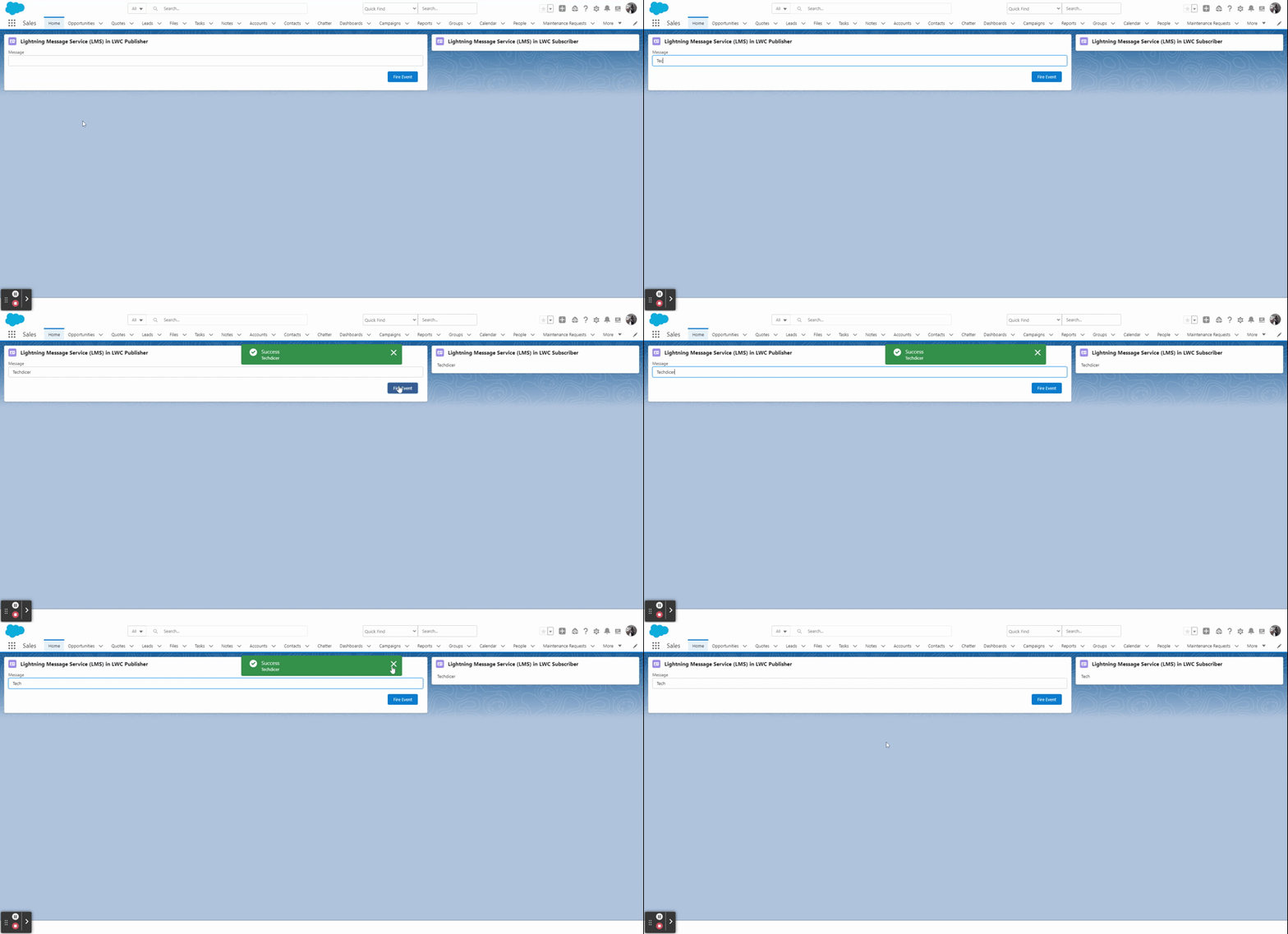
 Lightning Message Service (LMS) in LWC Salesforce. LMS doesn’t need any relationship between the component. Just publish the event from one component and subscribe by multiple components simultaneously.

lightning-message-service-(lms)-in-lwc-output

Key Highlights :

  1. Lightning Message Service is based on a new type of metadata: Lightning Message Channels
  2. Enable communication between the Visualforce page, Lightning web components, and Aura components.
  3. In LWC we will be using LMS when we want to send data from one LWC to another LWC which are not in the hierarchy.

Process & Code :

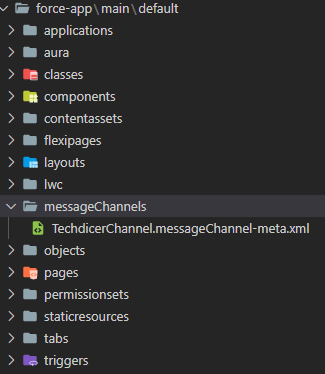
Step 1: Here we will create a Lightning Message Service (LMS) file in the messageChannels folder in the default branch.

lightning-message-service-(lms)-in-lwc-folder-creatation
lightning-message-services-(lms)-in-lwc-folder-creatation

TechdicerChannel.messageChannel-meta.xml :

1
2
3
4
5
6
7
8
9
10
<?xml version="1.0" encoding="UTF-8"?>
<LightningMessageChannel xmlns="http://soap.sforce.com/2006/04/metadata">
    <description>This is a Lightning Message Service Channel.</description>
    <isExposed>true</isExposed>
    <lightningMessageFields>
        <description>This is sample message</description>
        <fieldName>message</fieldName>
    </lightningMessageFields>
    <masterLabel>TechdicerChannel</masterLabel>
</LightningMessageChannel>

Step 2: In this step, we will create two LWC component which is not related to each other, one is the Publisher and another one is the Subscriber component.

lWCLMS.HTML : this is the Publisher component.

1
2
3
4
5
6
7
8
9
10
11
<template>
    <lightning-card title="Lightning Message Service (LMS) in LWC Publisher" icon-name="standard:contact">
        <div class="slds-p-horizontal_small">
            <lightning-input type="text" label="Message" onchange={handleChange} value={message}></lightning-input>
            <!-- call subscriber -->
            <div class="slds-p-around_medium lgc-bg" style="text-align: end;">
                <lightning-button label="Fire Event" variant="brand" onclick={handleClick}></lightning-button>
            </div>   
        </div>
    </lightning-card>
</template>

lWCLMS.JS :

1
2
3
4
5
6
7
8
9
10
11
12
13
14
15
16
17
18
import { LightningElement, wire } from 'lwc';
import TechdicerChannel from '@salesforce/messageChannel/TechdicerChannel__c';
import {publish, MessageContext} from 'lightning/messageService'
 
export default class LWCLMS extends LightningElement {
    @wire(MessageContext)
    messageContext;
    message;
 
    handleChange(event){
        this.message = event.detail.value;
    }
 
    handleClick() {
        let message = {message: this.message};
        publish(this.messageContext, TechdicerChannel, message);
    }
}

subscriber.HTML : This is the Subscriber Component.

1
2
3
4
5
6
7
<template>
    <lightning-card title="Lightning Message Service (LMS) in LWC Subscriber" icon-name="standard:contact">
        <div class="slds-m-around_medium">
            {publisherMessage}
        </div>
    </lightning-card>
</template>

subscriber.JS :

1
2
3
4
5
6
7
8
9
10
11
12
13
14
15
16
17
18
19
20
21
22
23
24
25
26
27
28
29
30
31
32
33
34
35
36
37
38
import { LightningElement, wire } from 'lwc';
import TechdicerChannel from '@salesforce/messageChannel/TechdicerChannel__c';
import { subscribe, MessageContext } from 'lightning/messageService';
import { ShowToastEvent } from 'lightning/platformShowToastEvent';
 
export default class Subscriber extends LightningElement {
    publisherMessage = '';
    subscription = null;
 
    @wire(MessageContext)
    messageContext;
 
    connectedCallback() {
        this.handleSubscribe();
    }
 
    handleSubscribe() {
        if (this.subscription) {
            return;
        }
        this.subscription = subscribe(this.messageContext, TechdicerChannel, (message) => {
            console.log(message.message);
            this.publisherMessage = message.message;
            this.ShowToast('Success', message.message, 'success', 'dismissable');
        });
    }
 
    ShowToast(title, message, variant, mode){
        const evt = new ShowToastEvent({
            title: title,
            message:message,
            variant: variant,
            mode: mode
        });
        this.dispatchEvent(evt);
    }
     
}